Artists, students, and designers increasingly rely on projection tools to simplify tracing and transfer detailed images onto canvases, boards, or walls. The following selections focus on art projectors optimized for tracing, with features like auto focus, keystone correction, drawing apps, and high-contrast projection. Each option listed below supports a range of surfaces and devices, helping you choose a projector that best fits your tracing workflow and creative style.
The table below summarizes five top choices, highlighting core strengths for tracing and artistic work. Use it as a quick reference when evaluating projection clarity, app features, and compatibility with your devices.
| Product | Key Benefit | Typical Use |
|---|---|---|
| Drawing Projector by GIKUCNZL | Dual-use projector; tracing and movie viewing | Tracing on canvases, walls; multimedia presentations |
| Caydo P1 Art Projector | Exclusive drawing app; adjustable via remote | Tracing, sketching, design previews |
| Caydo P3 Art Projector | Native 1080P; auto focus; 40’’-120’’ projection | High-precision tracing, large-format drawings |
| Caydo P1 (Second Model) | 4K support; vivid color rendering | Tracing and detailed reference work |
| Mini Portable Themed Projectors (ClokoWe / Tecaki / ELEPHAS variants) | Compact portability; multiple connectivity options | On-the-go tracing, small-space studios |
Below you’ll find five carefully chosen options, each described with its notable features, display capabilities, and how it supports tracing workflows without overcomplicating setup.
GIKUCNZL Drawing Projector For Tracing
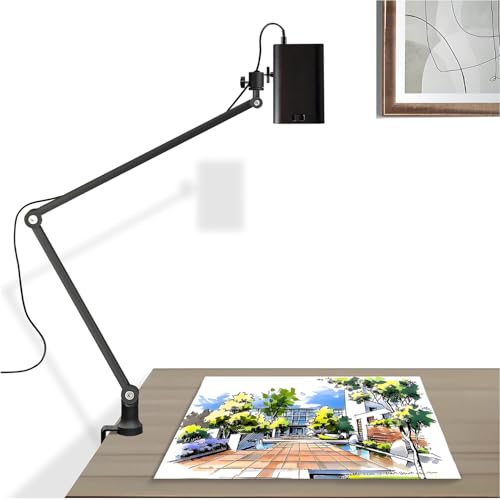
The GIKUCNZL drawing projector offers a dual-purpose design, serving both tracing needs and general projection for movies or presentations. It supports a projection size up to 10.5 feet, making it suitable for canvases, desktops, and walls. The device emphasizes a balance between clarity for tracing and versatility for multimedia use, ensuring reliable performance across a variety of artistic setups. Connectivity supports wireless and wired screen mirroring, enabling flexible device pairing with smartphones, tablets, laptops, and more. This model is particularly useful for artists who frequently switch between tracing detailed references and presenting work to others.
Caydo P1 Art Projector With Drawing App

The Caydo P1 combines a robust LED art projector with an exclusive drawing app designed to streamline the tracing workflow. It offers flexible zoom, 360-degree rotation, full-screen display, and grid options to support precise alignment. The platform includes multiple background colors and four drawing modes—Gridify, Sketchify, Comicize, and Monochromize—allowing artists to customize their tracing process. In addition, screen mirroring options (Eshare, AirPlay, MiraCast) enable easy transfer of images to the projector, reducing the friction of preparing reference material.
Caydo P3 Art Projector With Drawing App

The Caydo P3 model emphasizes higher brightness with 400 ANSI lumens and native 1080P projection. This configuration improves tracing accuracy in varied lighting environments. Auto focus and keystone correction help maintain sharp, proportionate images quickly, reducing setup time. The built-in drawing app provides similar tools as the P1, plus support for 3×3 grids and four artistic modes—Gridify, Sketchify, Comicize, and Monochromize. The projector also supports 4K video playback and long lamp life, making it a durable option for frequent use in studios.
Caydo P1 Art Projector With Drawing App (Second Caydo Model)

This Caydo P1 variant mirrors the design philosophy of the P1 but emphasizes the integrated drawing app with a similar feature set: zoom, rotation, grid overlays, 3 background colors, and four drawing modes. The device supports multiple projection options and convenient remote control operation for quick access to functions. Its versatility makes it a strong choice for artists who want a portable tracing solution without sacrificing the option for screen-mirroring entertainment.
ClokoWe Mini Projector With Enhanced Portability

The ClokoWe mini projector represents a compact option for tracing and small-space studios. It delivers 9000 lux brightness and supports 1080P Full HD with a 60–100 inch display range, making it practical for quick tracing tasks and casual viewing. The design emphasizes portability with a compact form factor and a carry-friendly box handle. It offers HDMI, USB, and AV connections, expanding compatibility with iPhone, Android devices, laptops, and TV sticks. Note that some streaming services may limit screen mirroring due to HDCP protection, so using an external streaming device is recommended for online references.
Tecaki Mini Portable Projector For Tracing

The Tecaki model highlights a balance between 4K input support and 1080P native projection, enabling detailed tracing from digital references while maintaining portability. With dual-band WiFi (2.4G + 5G) and Bluetooth, it supports wireless streaming and screen mirroring from compatible devices. While Bluetooth is limited to audio transmission, the projector pairs well with a streaming device or HDMI connection for videos and images. The compact footprint makes it suitable for small studios or on-location tracing projects and it supports a variety of devices via HDMI, USB, and more.
Buying Guide: Key Factors For Choosing An Art Projector For Tracing
Resolution And Image Clarity
Look for at least 1080p native resolution with 4K support or higher when possible. Higher brightness (ANSI lumens) helps tracing on brighter walls or daylight conditions, and good color accuracy ensures lines appear crisp against any reference image.
Auto Focus and Keystone Correction
Auto focus reduces setup time, while keystone correction preserves proportional accuracy when projecting at an angle. Both features are important for tracing precise curves and grids.
Drawing App And Tools
Projectors with built-in drawing apps or extensive grid/overlay options streamline tracing workflows. Features to watch include adjustable zoom, rotation, grid density, background colors, and dedicated remotes for quick access.
Connectivity And Compatibility
Common options include HDMI, USB, wireless screen mirroring, Eshare, AirPlay, and MiraCast. Consider whether you’ll connect to phones, tablets, laptops, or streaming devices. Ensure compatibility with your preferred devices and apps, especially if you frequently pull reference images online.
Portability And Setup
Portability is valuable for on-the-go tracing or small studios. Mini projectors with compact housings and lightweight builds fit tighter spaces. Consider a tripod compatibility or included stands for stable, repeatable tracing results.
Durability And Lamp Life
Long lamp life reduces maintenance, while durable construction supports frequent handling during art sessions. Some models advertise extended LED lifespans, reducing replacement frequency.
Price And Value
Entry-level models offer essential tracing features, while premium units emphasize advanced apps and higher brightness. Balance your budget with the features that most directly improve your tracing workflow and output quality.
Across these options, users should align features with their core tracing needs: are you prioritizing precise line accuracy on a canvas, or do you also want robust multimedia capabilities for presentations and demos? The right art projector can streamline your tracing process, reduce manual copying, and foster a smoother creative workflow while remaining adaptable to different projects and surfaces.