Searching for a reliable cutting machine to make stickers, labels, and custom crafts? This guide highlights five popular models that combine printing, cutting, and smart features to streamline sticker projects. From all-in-one printers to dedicated vinyl cutters, these picks cover varied budgets and workflows, helping you print vivid designs and cut with precision. Each entry includes core capabilities, ideal use cases, and how it fits into a sticker-focused creativity plan.
Product Overview
| Product | Brand | Key Strengths | Best For |
|---|---|---|---|
| Liene PixCut S1 Color Sticker Printer & Cutting Machine | Liene | All-in-one printing and die-cutting; AI image extraction; 300 DPI dye-sublimation | Owners who want an everything-in-one sticker maker with AI features |
| Brother ScanNCut SDX125E | Brother | Built-in scanner; 682 patterns; 5″ touchscreen; auto blade | Projects that benefit from scanning drawings directly into cut files |
| Cricut Joy Xtra | Cricut | Multi-material support; print then cut with home printer; precise cuts | Home crafters needing versatile material compatibility |
| LOKLiK Cutting Machine 2 | LOKLiK | 5-in-1 functions; AI painting; no-subscription software | All-in-one creative machine with AI design options |
| VEVOR Vinyl Cutter Machine (28 inch) | VEVOR | Large cutting area; adjustable pressure/speed; bundled accessories | Big sticker projects and batch labeling |
Below, you’ll find practical, objective details about five top options tailored for sticker making. The focus is on capabilities relevant to printing, cutting precision, and ease of use, helping you compare how they handle common sticker workflows.
Liene PixCut S1 Color Sticker Printer & Cutting Machine

The Liene PixCut S1 combines printing and precision die-cutting in one compact unit. It supports smartphone-based editing and Bluetooth transfer, enabling quick sticker creation from photos or graphics. With a 300 DPI thermal dye-sublimation process, you can produce vibrant labels and photos with broad color fidelity. AI image extraction helps convert nearly any image into a sticker cut file, expanding creative possibilities for custom gifts, memories, and branding projects. A straightforward workflow makes it suitable for hobbyists and small studios alike, especially where space is limited or speed matters.
Key features include: all-in-one operation to print and cut in a single step; AI-driven image extraction to convert elements into stickers; and high-resolution color output with vivid, durable results. If you want an integrated system that minimizes steps and enhances creativity through AI tools, the PixCut S1 is a strong option for sticker-centric tasks.
Brother ScanNCut SDX125E
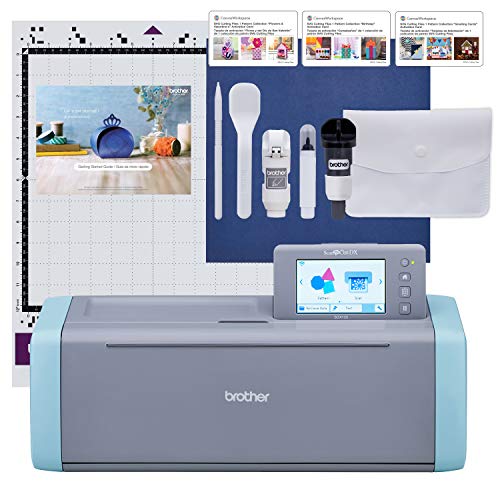
The Brother ScanNCut SDX125E integrates a built-in scanner to convert drawings or printed designs directly into cut files. This feature makes it easy to turn hand-drawn sticker concepts into production-ready cuts without needing an external scanner. It ships with 682 built-in designs and 9 fonts, plus a 5″ touchscreen for quick edits. The auto blade recognition and material sensor simplify setup, removing guesswork for material thickness. It is well-suited for crafters who frequently translate sketches into stickers and cards, and who value a broad design library and easy access to additional patterns via USB or wireless connections.
Considerations include the value of scanning-native workflows and the convenience of the sensor-driven cutting process. Users should account for the learning curve of the interface and the potential need for trial cuts to dial in settings for new materials. Overall, the ScanNCut SDX125E offers robust versatility for sticker projects that mix drawn art with printed elements.
Cricut Joy Xtra

The Cricut Joy Xtra is designed for home crafters who want reliable performance with multiple materials. It supports vinyl, iron-on, and cardstock, and can be used with a home printer to print then cut full-color designs. The machine is known for precise cuts on intricate patterns and works well for sticker sheets, decals, and small label runs. While the Joy Xtra emphasizes portability and quick setup, users should be mindful of mat compatibility and material limits for more complex or large-format sticker jobs.
Best suited for: quick turnaround projects, small-scale sticker sets, and beginners who appreciate a guided, user-friendly ecosystem with a broad accessory lineup and strong software support.
LOKLiK Cutting Machine 2

The LOKLiK Cutting Machine 2 positions itself as a 5-in-1 platform for cutting, drawing, writing, deep cutting, and foil printing, with AI painting features accessible via its software. It targets versatile crafts beyond stickers, including cards, home decor, and packaging. The machine emphasizes precision with an assumed 0.5 mm cut-accuracy, which helps minimize material waste on detailed sticker designs. A subscription-free software model lowers ongoing costs, appealing to budget-conscious hobbyists and small studios seeking broad creative flexibility.
Considerations include evaluating whether the 5-in-1 toolset aligns with your primary sticker goals and if the AI painting feature genuinely adds value to your design workflow. For users who want a single device capable of many finishes, LOKLiK offers a compelling mix of performance and versatility without mandatory software subscriptions.
VEVOR Vinyl Cutter Machine (28 Inch)

The VEVOR vinyl cutter provides a large 28-inch cutting area, suited for bigger sticker sheets and signage. It offers adjustable pressure and speed, with powerful stepper motors to handle thicker materials. The LCD panel helps you dial in precise settings, and the package includes several rolls of vinyl and practical accessories. This model appeals to users pursuing high-volume sticker production or larger-format decals, where a broader working width translates into faster output per run.
Users should assess workspace size and the ongoing cost of consumables. While the core cutting capability is strong, compatibility with third-party software and the availability of updates can influence long-term versatility. For ambitious sticker projects or small business labeling, the VEVOR model provides a sturdy, professional-grade option.
Likcut Glee S501 / Likcut Brand

The Likcut Glee S501 is a compact, beginner-friendly vinyl cutter designed for home and school projects. It emphasizes intuitive software to simplify sticker design, with quick Bluetooth or USB connections. A built-in front cover storage area helps keep tools organized for quick workflows—handy for teachers and students or hobbyists who value a tidy workspace. The Glee model suits small-scale sticker tasks, party favors, and decorative labels, offering dependable performance without a steep learning curve.
Purchase considerations include assessing whether a plug-and-play system meets your needs and if the compact footprint fits your workspace. The inclusion of storage features and straightforward connectivity makes Likcut Glee a practical entry point for sticker education and casual crafting.
Buying Guide: Key Purchase Considerations for Sticker Cutting Machines
- Print-and-cut workflow vs. standalone cutter: If you frequently print designs before cutting, prefer all-in-one devices or systems with reliable print-to-cut integration.
- Material support and cutting width: Consider the typical sticker sizes you create. Large-format jobs benefit from wider cutting beds, while small projects can thrive with compact units.
- Cutting precision and die-cut quality: Look for machines with consistent blade performance, precise registration, and material sensing if you work with varied substrates.
- Software ecosystem: A user-friendly interface, templates, and design libraries speed up production. Subscription-free options may reduce long-term costs.
- AI and automation features: AI-driven image extraction or painting can unlock new sticker ideas but evaluate whether these capabilities match your creative needs and budget.
- Connectivity and portability: Bluetooth, USB, and Wi-Fi options determine how easily you integrate the device into existing workflows and share designs across devices.
- Durability and support: For ongoing sticker production, choose models with robust build quality and reliable customer support or community resources.
- Accessories and consumables: Bundled blades, rolls, mats, and vinyl stock affect initial setup costs and ready-to-work capabilities.
When evaluating options, define your sticker goals (small batches vs. large runs, home use vs. small business) and balance price with features that directly impact your workflow. For mixed-use studios, machines with strong design software, scalable cutting widths, and reliable print-to-cut pipelines typically offer the best value over time.