For hobbyists, small businesses, or enthusiasts starting out in laser engraving and cutting, selecting a beginner-friendly machine matters. The following five models balance safety features, ease of setup, and reliable performance on wood and common materials. This guide highlights what each unit offers, how they perform on wood, and key considerations for aspiring makers.
| Product | Laser Power | Working Area | Key Benefit | Brand |
|---|---|---|---|---|
| ACMER S1 3500mW | 3.5W | 130x130mm | High precision for fine wood and acrylic work | ACMER |
| Carverall K15 Pro 5W | 5W | 200x300mm | Real 5W power with fast, accurate engraving | Carverall |
| Woxcker L2 Flex 5W | 5W | Unavailable exact size stated; enclosure included | 360° enclosure for safety and clean workspace | Woxcker |
| Creality Falcon 5W | 5W | 400x415mm | Large working area and precise control | CREALITY FALCON |
| Longer Ray5 20W | 20W | 400x400mm | High-power cutting with multi-material capability | Longer |
ACMER S1 3500mW Laser Engraver

ACMER’s S1 3500mW model emphasizes ultra-fine accuracy with a 0.04mm laser spot and a 2mm focal length. It operates at a wavelength around 455 nm and can reach speeds up to 10,000 mm/min, with repeatable positioning accuracy of 0.01 mm. The双-function device can engrave on wood, bamboo, leather, plastic, PCB, ceramics, and more, while also capable of light cutting on thin plywood, MDF, and acrylic. The unit is designed for beginners, arriving largely preassembled and offering a quick setup with a simple laser head installation. This makes it a compelling option for hobbyists who want fast operation without an extended learning period.
ACMER S1 6000mW Laser Engraver

The 6000mW variant shares the same 130x130mm work area and 2mm focal length, delivering higher power for deeper engraving and faster cutting through materials like thin wood, acrylic, and some ceramics. It retains the beginner-friendly setup, with a 455±5nm diode and 0.01mm repeatable positioning accuracy. The device supports a wide material range and comes preassembled to minimize the initial learning curve, making it a strong choice for those expanding from basic projects to more ambitious designs.
Carverall K15 Pro 5W
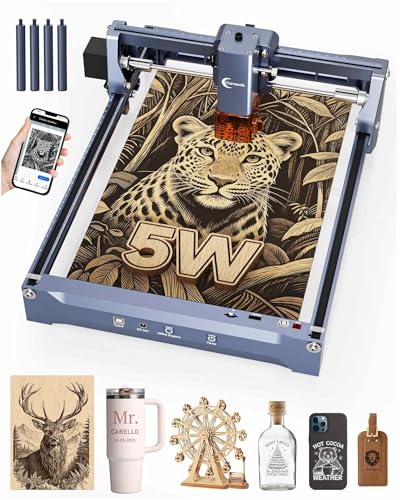
Carverall’s K15 Pro is built for precision and versatility. With an authentic 5W laser power, it can engrave on wood, coated metals, and other materials, and cut through thicker wood or acrylic in single passes. It boasts a fast engraving speed of up to 15,000 mm/min and a high-precision 0.01 mm fidelity. The machine supports popular software ecosystems and offers a straightforward assembly process, enabling quick startup for beginners while still delivering professional results for more complex projects.
Woxcker L2 Flex 10W Laser Engraver

This Woxcker L2 Flex model features a 10W laser module and a 360° enclosure that enhances safety and workspace cleanliness. The 0.01 mm engraving precision ensures detailed texturing on wood, leather, acrylic, and other materials, while the enclosed design reduces exposure to fumes and dust. Ideal for hobbyists who want extra power without sacrificing safety, it pairs robust performance with a user-friendly experience suitable for beginners beginning broader projects.
Creality Falcon 5W Laser Engraver
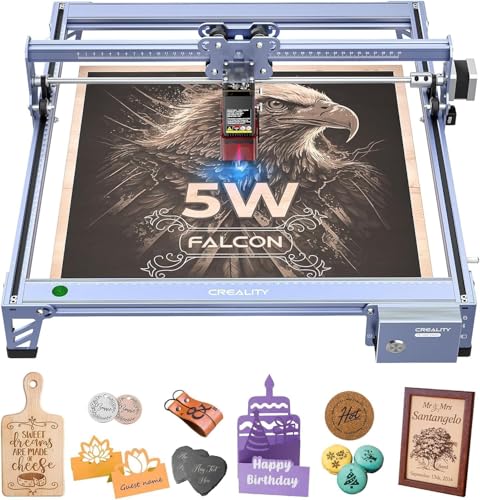
The Creality Falcon 5W focuses on a large working area (400x415mm) and high-precision engraving. It uses a 0.06×0.06 mm laser spot and claims precise repetition with minimal repositioning errors. The 32-bit controller supports speedy engraving up to 10,000 mm/min, enabling efficient handling of larger designs. Optional add-ons like a rotary roller or risers expand capabilities for cylindrical or taller objects, making it a versatile option for beginners planning bigger projects.
Buying Guide: Key Considerations for Beginners
- Power and material suitability: For beginners, 3–5W units are typically sufficient for wood, acrylic, and leather. Higher power (like 10W or 20W) enables deeper cuts but requires more caution, ventilation, and safety practices.
- Working area: A larger bed (e.g., 200x300mm or bigger) supports bigger designs, but consider whether your typical projects fit within shorter dimensions. A larger area may come with higher price and setup complexity.
- Safety features: Look for full enclosures, interlocks, and smoke/dust containment. Class 1 devices and enclosed systems reduce exposure and noise, which is important for home environments.
- Ease of use: Preassembled units with straightforward installation help beginners start quickly. Software compatibility (LightBurn, LaserGRBL, CutLabX) also matters for a smoother learning curve.
- Materials and versatility: Check supported materials (wood, plywood, acrylic, leather, ceramics, metal) to ensure the device aligns with your planned projects.
- Upgrade paths and accessories: Consider availability of add-ons like rotary rollers, extra lenses, and higher-capacity power supplies. These expand capabilities as skills grow.
- Safety and ventilation: Adequate ventilation and eye protection are essential, especially when cutting materials that emit fumes. Plan a safe workspace before purchasing.
- Support and community: A responsive seller and a strong user community can be valuable for troubleshooting and project inspiration.
- Budget balance: Beginners should weigh initial cost against potential needs for upgrades or future expansion when choosing a model.